
Download Parabrain – AI Knowledge Platform for Professionals, Academics, and Teams
Parabrain.ai is a web‑based AI knowledge platform designed for scholars, researchers, and industry experts who want to turn their personal notes, research papers, and project documents into a living, learning assistant. By uploading source material, users train a bespoke AI that grows into an expert in their specific field, delivering instant insights, summarizations, and recommendations. The platform also supports collaborative AI‑sharing, virtual tutoring, and community‑driven knowledge exchange, making it a powerful catalyst for professional development and interdisciplinary innovation.
Overview & Core Features
Parabrain distinguishes itself in the crowded AI‑assistant market by refusing to rely on a single, generic language model. Instead, it empowers each user to feed the system with their own intellectual assets—lecture notes, PDFs, spreadsheets, code snippets, and even multimedia transcripts. The AI then internalizes the nuances of a particular discipline, creating a knowledge‑specific assistant that can answer questions with the same terminology, citation style, and depth that the original author would use. This deep personalization drives productivity, reduces time spent searching for information, and helps professionals stay ahead of emerging trends.
The platform’s architecture is built around continuous learning. As users add new documents, the AI automatically re‑indexes and refines its understanding, ensuring that the assistant evolves alongside the user’s growing body of work. Over time, the AI can recognize patterns, suggest relevant literature, and even propose novel research directions based on gaps it identifies in the uploaded corpus. This feedback loop transforms a static library of files into a dynamic research partner.
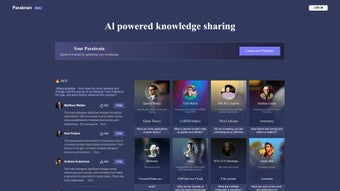
Beyond the individual experience, Parabrain fosters a collaborative ecosystem. Users can opt‑in to share their trained AI with colleagues or the broader community, creating a marketplace of specialized assistants that collectively cover a wide spectrum of academic and professional domains. The marketplace supports both free sharing and monetization, allowing experts to generate revenue from highly curated models while giving others access to niche expertise they would otherwise have to build from scratch.
Key advantages of Parabrain include:
- Personalized AI training using user‑uploaded documents, notes, and datasets.
- Continuous learning: the AI refines its knowledge base as new material is added.
- Collaborative AI marketplace where creators can publish, monetize, or freely share their models.
- Virtual tutoring hub with on‑demand access to subject‑matter experts.
- Cross‑disciplinary knowledge bridges, enabling interdisciplinary research.
- Secure cloud storage with end‑to‑end encryption for all uploaded content.
- Intuitive dashboard with analytics on AI usage, citation trends, and productivity gains.
- API access for integration with existing LMS, research portals, or corporate intranets.
- Multi‑language support for global academic communities.
Installation, Setup & Daily Usage
Because Parabrain is a fully web‑based service, there is no traditional “download and install” process for desktop operating systems. Users simply create an account on parabrain.ai, verify their email, and gain immediate access to the platform through any modern browser (Chrome, Edge, Firefox, Safari). For teams that require tighter integration with corporate security policies, Parabrain offers a SAML‑based Single Sign‑On (SSO) option and can be deployed behind a VPN or within a private cloud instance.
Getting started is straightforward:
- Account creation: Register with a professional email address. Choose a subscription tier (Free, Professional, Enterprise) based on storage needs and collaboration features.
- Upload your knowledge base: Drag‑and‑drop PDFs, Word docs, markdown files, or CSV datasets into the “My Library” section. The platform automatically parses text, extracts metadata, and indexes content for AI training.
- Train your AI: Click “Create Parabrain” and select the documents you want the model to learn from. The training process runs in the cloud and typically completes within minutes for small collections, or a few hours for larger corpora.
- Interact with your AI: Use the chat‑style interface to ask questions, request summaries, or generate citations. The AI responds with citations linked back to the original source, ensuring academic integrity.
- Collaborate: Invite teammates to view or co‑train the same AI. You can also browse the community marketplace to adopt AI models created by peers in related fields.
Daily workflow often looks like this: a researcher uploads the latest conference proceedings, trains the AI, then uses it to draft literature reviews in minutes. An engineering manager uploads product specifications and leverages the AI to generate quick feasibility analyses for cross‑functional meetings. The seamless browser experience means you can work from Windows, macOS, Linux, iOS, or Android without any additional installations.
For power users, Parabrain provides a set of advanced tools: custom prompt engineering, fine‑tuning parameters, and version control for AI models. The RESTful API lets developers embed the assistant into internal portals, while the LTI connector integrates directly with learning management systems such as Canvas, Blackboard, and Moodle. Troubleshooting is supported through an in‑app knowledge base, live chat, and community forums where users share best practices for data preparation and model optimization.
Supported operating systems include Windows 10/11, macOS Monterey and later, Linux distributions with modern browsers, iOS 13+, and Android 9+.
Pros, Cons & Frequently Asked Questions
Pros
- Deep personalization: AI learns directly from your own material, delivering highly relevant answers that reflect your unique research context.
- Collaboration‑friendly: Share and monetize AI models within a thriving community, turning expertise into a reusable asset.
- Secure and compliant: End‑to‑end encryption, GDPR‑ready, and optional SSO for enterprises protect sensitive data.
- Time‑saving automation: Automates literature reviews, data extraction, and report drafting, freeing hours each week.
- Scalable architecture: From solo scholars on the free tier to large research teams on Enterprise, the platform grows with you.
Cons
- Learning curve for advanced features: API integration and custom model fine‑tuning require technical knowledge that may be daunting for non‑developers.
- Dependent on internet connectivity: As a cloud service, offline access is limited, which can be a drawback in low‑bandwidth environments.
- Subscription cost for premium tiers: Full collaboration, API access, and large‑scale storage are behind a paywall, which may be prohibitive for budget‑constrained users.
Frequently Asked Questions
How does Parabrain protect my uploaded documents?
All files are encrypted at rest and in transit using AES‑256 encryption. Access is restricted to the account owner unless they explicitly share the AI model. Parabrain also complies with GDPR, CCPA, and ISO‑27001 standards.
Can I use Parabrain on a mobile device?
Yes. The platform is fully responsive and works on iOS Safari and Android Chrome. Mobile users can upload files, train AI, and chat with their assistant just like on a desktop.
Is there a free version available?
Parabrain offers a free tier that includes up to 5 GB of storage, basic AI training, and limited community sharing. Professional and Enterprise plans unlock additional storage, advanced collaboration tools, and API access.
How quickly does the AI learn from my documents?
Training time varies with the size of the dataset. Small libraries (under 100 MB) typically finish within minutes, while larger corpora (several gigabytes) may take a few hours. Progress is displayed in real‑time on the dashboard.
Can I integrate Parabrain with my university’s LMS?
Yes. Parabrain provides RESTful APIs and LTI (Learning Tools Interoperability) connectors that enable seamless integration with platforms such as Canvas, Blackboard, and Moodle.
Conclusion & Call to Action
Parabrain.ai redefines how professionals and academics interact with their own knowledge. By converting personal documents into a living AI assistant, the platform eliminates the repetitive grunt work of searching, summarizing, and cross‑referencing. Its collaborative marketplace encourages a culture of shared expertise, while robust security and flexible deployment options make it suitable for both individual researchers and large enterprises.
The free tier provides enough functionality to test the concept, and the upgrade paths scale seamlessly as your needs grow. Whether you are a graduate student drafting a thesis, a corporate analyst preparing a market report, or a cross‑functional team needing rapid access to technical specifications, Parabrain offers a secure, scalable, and intelligent solution that fits directly into your existing workflow.
Ready to experience a smarter way to learn? Create your Parabrain account today, upload your first set of notes, and watch your personal AI evolve into a true subject‑matter expert.



.png)



